从节点到效果
打开对应.max,M打开材质编辑器;Emission决定发光颜色,Opacity决定可见形状。以下数值是工程实施值;来源与补齐边界见每课“待核对与差异”。
01_圆柱碎片消散

40帧;开放圆筒承载细胞碎片,发光与侵蚀遮罩分开。
- 建半径40、高40、18边圆筒,转可编辑多边形,删除上下端盖。
- Cellular与竖向Gradient相乘→Mapped/Solid阈值:生成碎片。
- Noise+颜色Ramp进入Emission;另一组Cellular和Color Correction进入Opacity:控制侵蚀。
补齐与适配
- 完整控制器切线柄与部分Composite混合设置未显示;工程内已采用注明的补齐值。
展开实际工程节点数值(打开文件后读回)
这些是工程实施值,包含上方明确标注的补齐设置;不应把它们全部当作老师原值。
#6 Fractal Detail:Noise
| 参数 | 实施值 |
|---|---|
| color1 | {"scene_rgb_255": [0.0, 0.0, 0.0]} |
| color2 | {"scene_rgb_255": [255.0, 255.0, 255.0]} |
| map1 | null |
| map2 | null |
| map1Enabled | true |
| map2Enabled | true |
| size | 0.10000000149011612 |
| phase | 0.0 |
| Levels | 3.0 |
| thresholdLow | 0.30000001192092896 |
| thresholdHigh | 0.800000011920929 |
| type | 1 |
坐标:{"blur": 1.0, "offset": [0.0, 0.0, 0.0], "angle": [0.0, 0.0, 0.0], "coordType": 2, "mapChannel": 1, "Tiling": [7.0, 1.5, 1.0], "Blur_Offset": 0.0}
CompositeTexturemap:Composite
| 参数 | 实施值 |
|---|---|
| mapEnabled | [true, true, true] |
| maskEnabled | [true, true, true] |
| blendMode | [0, 5, 5] |
| layername | ["", "", ""] |
| dlgOpened | [true, true, true] |
| opacity | [100.0, 100.0, 100.0] |
CompositeTexturemap:Composite
| 参数 | 实施值 |
|---|---|
| mapEnabled | [true, true] |
| maskEnabled | [true, true] |
| blendMode | [0, 5] |
| layername | ["", ""] |
| dlgOpened | [true, true] |
| opacity | [100.0, 100.0] |
CompositeTexturemap:Composite
| 参数 | 实施值 |
|---|---|
| mapEnabled | [true, true, true, true] |
| maskEnabled | [true, true, true, true] |
| blendMode | [0, 5, 5, 5] |
| layername | ["", "", "", ""] |
| dlgOpened | [true, true, true, true] |
| opacity | [100.0, 20.0, 100.0, 100.0] |
#13 Linear Fade:Color Correction
| 参数 | 实施值 |
|---|---|
| color | {"scene_rgb_255": [255.0, 255.0, 255.0]} |
| map | null |
| rewireMode | 0 |
| rewireR | 0 |
| rewireG | 1 |
| rewireB | 2 |
| rewireA | 3 |
| hueShift | 0.0 |
| saturation | 0.0 |
| tint | {"scene_rgb_255": [0.0, 0.0, 0.0]} |
| tintStrength | 0.0 |
| lightnessMode | 0 |
| contrast | 0.0 |
| brightness | 0.0 |
| exposureMode | 0 |
| enableR | false |
| enableG | false |
| enableB | false |
| gainRGB | 100.0 |
| gainR | 100.0 |
| gainG | 100.0 |
| gainB | 100.0 |
| gammaRGB | 1.0 |
| gammaR | 1.0 |
| gammaG | 1.0 |
| gammaB | 1.0 |
| pivotRGB | 1.0 |
| pivotR | 1.0 |
| pivotG | 1.0 |
| pivotB | 1.0 |
| liftRGB | 0.0 |
| liftR | 0.0 |
| liftG | 0.0 |
| liftB | 0.0 |
| printerLights | 5.0 |
#2 Solid Threshold:Gradient Ramp
| 参数 | 实施值 |
|---|---|
| size | 1.0 |
| phase | 0.0 |
| amount | 0.0 |
| Gradient_Type | 5 |
| Noise_Type | 0 |
| Levels | 4.0 |
| Low_Threshold | 0.0 |
| High_Threshold | 1.0 |
| Threshold_Smoothing | 0.0 |
| Source_Map_On | 1 |
| Source_Map | {"connection": "CompositeTexturemap:Composite", "handle": 76541} |
色标(位置 → 场景RGB):0 → (0.0, 0.0, 0.0);50 → (255.0, 255.0, 255.0);100 → (255.0, 255.0, 255.0)
坐标:{"blur": 1.0, "mapping": 0, "mapChannel": 1, "mappingType": 0, "UVW_Type": 0, "U_Mirror": false, "V_Mirror": false, "U_Tile": true, "V_Tile": true, "showMapOnBack": true, "Noise_On": false, "Noise_Animate": false, "UVTransform": "(matrix3 [1,0,0] [0,1,0] [0,0,1] [0,0,0])", "realWorldScale": false, "realWorldHeight": 1.0, "realWorldWidth": 1.0, "phase": 0.0, "Blur_Offset": 0.0, "w_angle": 0.0, "U_Offset": 0.0, "V_Offset": 0.0, "U_Tiling": 1.0, "V_Tiling": 1.0, "U_Angle": 0.0, "V_Angle": 0.0, "Noise_Amount": 1.0, "Noise_Size": 1.0, "Noise_Levels": 1}
#3 Vertical Gate:Gradient Ramp
| 参数 | 实施值 |
|---|---|
| size | 1.0 |
| phase | 0.0 |
| amount | 0.0 |
| Gradient_Type | 4 |
| Noise_Type | 0 |
| Levels | 4.0 |
| Low_Threshold | 0.0 |
| High_Threshold | 1.0 |
| Threshold_Smoothing | 0.0 |
| Source_Map_On | 1 |
色标(位置 → 场景RGB):0 → (0.0, 0.0, 0.0);50 → (255.0, 255.0, 255.0);100 → (0.0, 0.0, 0.0)
坐标:{"blur": 1.0, "mapping": 0, "mapChannel": 1, "mappingType": 0, "UVW_Type": 0, "U_Mirror": false, "V_Mirror": false, "U_Tile": true, "V_Tile": true, "showMapOnBack": true, "Noise_On": false, "Noise_Animate": false, "UVTransform": "(matrix3 [0,1,0] [-1,0,0] [0,0,1] [1,0,0])", "realWorldScale": false, "realWorldHeight": 1.0, "realWorldWidth": 1.0, "phase": 0.0, "Blur_Offset": 0.0, "w_angle": 90.0, "U_Offset": 0.0, "V_Offset": 0.0, "U_Tiling": 1.0, "V_Tiling": 1.0, "U_Angle": 0.0, "V_Angle": 0.0, "Noise_Amount": 1.0, "Noise_Size": 1.0, "Noise_Levels": 1}
#8 Blue Orange Gold:Gradient Ramp
| 参数 | 实施值 |
|---|---|
| size | 1.0 |
| phase | 0.0 |
| amount | 0.0 |
| Gradient_Type | 5 |
| Noise_Type | 0 |
| Levels | 4.0 |
| Low_Threshold | 0.0 |
| High_Threshold | 1.0 |
| Threshold_Smoothing | 0.0 |
| Source_Map_On | 1 |
| Source_Map | {"connection": "#7 Palette Cellular:Cellular", "handle": 76829} |
色标(位置 → 场景RGB):0 → (3.0, 3.0, 140.0);50 → (241.0, 85.0, 35.0);100 → (255.0, 139.0, 32.0)
坐标:{"blur": 1.0, "mapping": 0, "mapChannel": 1, "mappingType": 0, "UVW_Type": 0, "U_Mirror": false, "V_Mirror": false, "U_Tile": true, "V_Tile": true, "showMapOnBack": true, "Noise_On": false, "Noise_Animate": false, "UVTransform": "(matrix3 [1,0,0] [0,1,0] [0,0,1] [0,0,0])", "realWorldScale": false, "realWorldHeight": 1.0, "realWorldWidth": 1.0, "phase": 0.0, "Blur_Offset": 0.0, "w_angle": 0.0, "U_Offset": 0.0, "V_Offset": 0.0, "U_Tiling": 1.0, "V_Tiling": 1.0, "U_Angle": 0.0, "V_Angle": 0.0, "Noise_Amount": 1.0, "Noise_Size": 1.0, "Noise_Levels": 1}
#1 Main Cellular:Cellular
| 参数 | 实施值 |
|---|---|
| cellColor | {"scene_rgb_255": [255.0, 255.0, 255.0]} |
| divColor1 | {"scene_rgb_255": [127.5, 127.5, 127.5]} |
| divColor2 | {"scene_rgb_255": [0.0, 0.0, 0.0]} |
| cellMap | null |
| divMap1 | null |
| divMap2 | null |
| map1Enabled | true |
| map2Enabled | true |
| map3Enabled | true |
| variation | 0.0 |
| size | 0.20000000298023224 |
| spread | 1.100000023841858 |
| lowThresh | 0.0 |
| midThresh | 0.5 |
| highThresh | 1.0 |
| type | 1 |
| fractal | true |
| iteration | 3.0 |
| roughness | 0.0 |
| smooth | 0.10000000149011612 |
| adaptive | true |
坐标:{"blur": 1.0, "offset": [0.0, 0.0, 0.0], "angle": [0.0, 0.0, 0.0], "coordType": 2, "mapChannel": 1, "Tiling": [4.0, 1.0, 1.0], "Blur_Offset": 0.0}
#7 Palette Cellular:Cellular
| 参数 | 实施值 |
|---|---|
| cellColor | {"scene_rgb_255": [255.0, 255.0, 255.0]} |
| divColor1 | {"scene_rgb_255": [127.5, 127.5, 127.5]} |
| divColor2 | {"scene_rgb_255": [0.0, 0.0, 0.0]} |
| cellMap | null |
| divMap1 | null |
| divMap2 | null |
| map1Enabled | true |
| map2Enabled | true |
| map3Enabled | true |
| variation | 0.0 |
| size | 0.10000000149011612 |
| spread | 0.4000000059604645 |
| lowThresh | 0.0 |
| midThresh | 0.5 |
| highThresh | 1.0 |
| type | 1 |
| fractal | true |
| iteration | 3.0 |
| roughness | 0.0 |
| smooth | 0.10000000149011612 |
| adaptive | true |
坐标:{"blur": 1.0, "offset": [0.0, 0.0, 0.0], "angle": [0.0, 0.0, 0.0], "coordType": 2, "mapChannel": 1, "Tiling": [8.0, 1.0, 1.0], "Blur_Offset": 0.0}
#12 Animated Erosion:Cellular
| 参数 | 实施值 |
|---|---|
| cellColor | {"scene_rgb_255": [255.0, 255.0, 255.0]} |
| divColor1 | {"scene_rgb_255": [255.0, 255.0, 255.0]} |
| divColor2 | {"scene_rgb_255": [0.0, 0.0, 0.0]} |
| cellMap | null |
| divMap1 | null |
| divMap2 | null |
| map1Enabled | true |
| map2Enabled | true |
| map3Enabled | true |
| variation | 0.0 |
| size | 0.20000000298023224 |
| spread | 0.10000000149011612 |
| lowThresh | 0.0 |
| midThresh | 0.5 |
| highThresh | 1.0 |
| type | 1 |
| fractal | true |
| iteration | 3.0 |
| roughness | 0.0 |
| smooth | 0.10000000149011612 |
| adaptive | true |
坐标:{"blur": 1.0, "offset": [0.0, 0.0, 0.0], "angle": [0.0, 0.0, 0.0], "coordType": 2, "mapChannel": 1, "Tiling": [1.0, 1.0, 1.0], "Blur_Offset": 0.0}
02_火焰平面_原生渐变
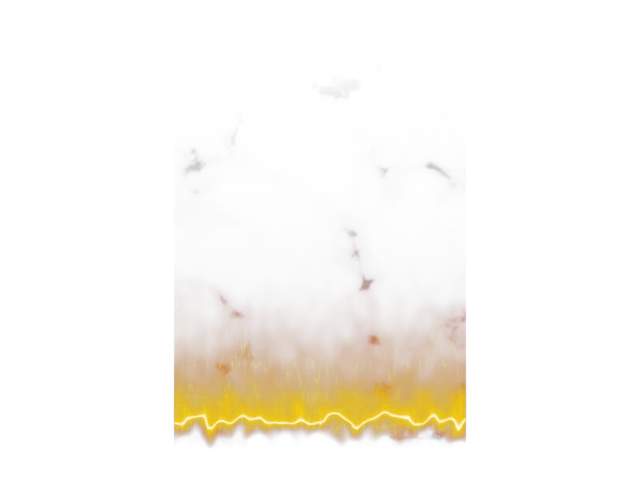
35帧;原生多旗标,Darken形状合成+Soft Light细节。
- 旧独立稿为宽350×长500;教学正确为宽500×长350,新11号工程已修正。建立平面,贴图坐标保持可用,材质Base0/Specular0/Emission1。
- Cellular(Size50,Spread3,Tiling2/.5/1)→Solid Ramp白标11。
- 高度Ramp:0黑、9黑、58灰32、93白、98灰18、100黑;W90,Ease In,Noise .05。与形状Darken。
- Smoke(Size15,Iterations5,Exponent.09,Tiling1/.2/1)→Ramp(0黑,10灰11,17灰58,23白,100白);Soft Light叠到形状。
- Mapped色谱:0黑、6(127,1,0)、26(190,28,0)、70(218,117,0)、96(231,161,0)、100白。颜色接Emission,形状接Opacity。
补齐与适配
- 视频Physical Material适配为Arnold Standard Surface。
- 火焰平面350×500、相机、未展示的动画起点及端点白色为补齐值。
- Ramp8插值未确认,工程采用Linear;其余新增旗标数值和最终合成模式见“深入核对”。
展开实际工程节点数值(打开文件后读回)
这些是工程实施值,包含上方明确标注的补齐设置;不应把它们全部当作老师原值。
CompositeTexturemap:Composite
| 参数 | 实施值 |
|---|---|
| mapEnabled | [true, true] |
| maskEnabled | [true, true] |
| blendMode | [0, 15] |
| layername | ["", ""] |
| dlgOpened | [true, true] |
| opacity | [100.0, 100.0] |
CompositeTexturemap:Composite
| 参数 | 实施值 |
|---|---|
| mapEnabled | [true, true] |
| maskEnabled | [true, true] |
| blendMode | [0, 4] |
| layername | ["", ""] |
| dlgOpened | [true, true] |
| opacity | [100.0, 100.0] |
#6 Smoke:Smoke
| 参数 | 实施值 |
|---|---|
| size | 15.0 |
| iterations | 5 |
| exponent | 0.09000000357627869 |
| phase | 0.0 |
| color1 | {"scene_rgb_255": [255.0, 255.0, 255.0]} |
| color2 | {"scene_rgb_255": [0.0, 0.0, 0.0]} |
| map1 | null |
| map2 | null |
| map1On | true |
| map2On | true |
坐标:{"blur": 1.0, "offset": [0.0, 0.0, 0.0], "angle": [0.0, 0.0, 0.0], "coordType": 0, "mapChannel": 1, "Tiling": [1.0, 0.20000000298023224, 1.0], "Blur_Offset": 0.0}
#10 Fire palette:Gradient Ramp
| 参数 | 实施值 |
|---|---|
| size | 1.0 |
| phase | 0.0 |
| amount | 0.0 |
| Gradient_Type | 5 |
| Noise_Type | 0 |
| Levels | 4.0 |
| Low_Threshold | 0.0 |
| High_Threshold | 1.0 |
| Threshold_Smoothing | 0.0 |
| Source_Map_On | 1 |
| Source_Map | {"connection": "CompositeTexturemap:Composite", "handle": 81329} |
色标(位置 → 场景RGB):0 → (0.0, 0.0, 0.0);6 → (127.0, 1.0, 0.0);26 → (190.0, 28.0, 0.0);70 → (218.0, 117.0, 0.0);96 → (231.0, 161.0, 0.0);100 → (255.0, 255.0, 255.0)
坐标:{"blur": 1.0, "mapping": 0, "mapChannel": 1, "mappingType": 0, "UVW_Type": 0, "U_Mirror": false, "V_Mirror": false, "U_Tile": true, "V_Tile": true, "showMapOnBack": true, "Noise_On": false, "Noise_Animate": false, "UVTransform": "(matrix3 [1,0,0] [0,1,0] [0,0,1] [0,0,0])", "realWorldScale": false, "realWorldHeight": 1.0, "realWorldWidth": 1.0, "phase": 0.0, "Blur_Offset": 0.0, "w_angle": 0.0, "U_Offset": 0.0, "V_Offset": 0.0, "U_Tiling": 1.0, "V_Tiling": 1.0, "U_Angle": 0.0, "V_Angle": 0.0, "Noise_Amount": 1.0, "Noise_Size": 1.0, "Noise_Levels": 1}
#2 Solid threshold 11:Gradient Ramp
| 参数 | 实施值 |
|---|---|
| size | 1.0 |
| phase | 0.0 |
| amount | 0.0 |
| Gradient_Type | 5 |
| Noise_Type | 0 |
| Levels | 4.0 |
| Low_Threshold | 0.0 |
| High_Threshold | 1.0 |
| Threshold_Smoothing | 0.0 |
| Source_Map_On | 1 |
| Source_Map | {"connection": "#1 Cellular:Cellular", "handle": 80339} |
色标(位置 → 场景RGB):0 → (0.0, 0.0, 0.0);11 → (255.0, 255.0, 255.0);100 → (255.0, 255.0, 255.0)
坐标:{"blur": 1.0, "mapping": 0, "mapChannel": 1, "mappingType": 0, "UVW_Type": 0, "U_Mirror": false, "V_Mirror": false, "U_Tile": true, "V_Tile": true, "showMapOnBack": true, "Noise_On": false, "Noise_Animate": false, "UVTransform": "(matrix3 [1,0,0] [0,1,0] [0,0,1] [0,0,0])", "realWorldScale": false, "realWorldHeight": 1.0, "realWorldWidth": 1.0, "phase": 0.0, "Blur_Offset": 0.0, "w_angle": 0.0, "U_Offset": 0.0, "V_Offset": 0.0, "U_Tiling": 1.0, "V_Tiling": 1.0, "U_Angle": 0.0, "V_Angle": 0.0, "Noise_Amount": 1.0, "Noise_Size": 1.0, "Noise_Levels": 1}
#4 Height envelope:Gradient Ramp
| 参数 | 实施值 |
|---|---|
| size | 1.0 |
| phase | 0.0 |
| amount | 0.05000000074505806 |
| Gradient_Type | 4 |
| Noise_Type | 0 |
| Levels | 4.0 |
| Low_Threshold | 0.0 |
| High_Threshold | 1.0 |
| Threshold_Smoothing | 0.0 |
| Source_Map_On | 1 |
色标(位置 → 场景RGB):0 → (0.0, 0.0, 0.0);9 → (0.0, 0.0, 0.0);58 → (32.0, 32.0, 32.0);93 → (255.0, 255.0, 255.0);98 → (18.0, 18.0, 18.0);100 → (0.0, 0.0, 0.0)
坐标:{"blur": 1.0, "mapping": 0, "mapChannel": 1, "mappingType": 0, "UVW_Type": 0, "U_Mirror": false, "V_Mirror": false, "U_Tile": true, "V_Tile": true, "showMapOnBack": true, "Noise_On": false, "Noise_Animate": false, "UVTransform": "(matrix3 [0,1,0] [-1,0,0] [0,0,1] [1,0,0])", "realWorldScale": false, "realWorldHeight": 1.0, "realWorldWidth": 1.0, "phase": 0.0, "Blur_Offset": 0.0, "w_angle": 90.0, "U_Offset": 0.0, "V_Offset": 0.0, "U_Tiling": 1.0, "V_Tiling": 1.0, "U_Angle": 0.0, "V_Angle": 0.0, "Noise_Amount": 1.0, "Noise_Size": 1.0, "Noise_Levels": 1}
#8 Smoke remap:Gradient Ramp
| 参数 | 实施值 |
|---|---|
| size | 1.0 |
| phase | 0.0 |
| amount | 0.0 |
| Gradient_Type | 5 |
| Noise_Type | 0 |
| Levels | 4.0 |
| Low_Threshold | 0.0 |
| High_Threshold | 1.0 |
| Threshold_Smoothing | 0.0 |
| Source_Map_On | 1 |
| Source_Map | {"connection": "#6 Smoke:Smoke", "handle": 81258} |
色标(位置 → 场景RGB):0 → (0.0, 0.0, 0.0);10 → (11.0, 11.0, 11.0);17 → (58.0, 58.0, 58.0);23 → (255.0, 255.0, 255.0);100 → (255.0, 255.0, 255.0)
坐标:{"blur": 1.0, "mapping": 0, "mapChannel": 1, "mappingType": 0, "UVW_Type": 0, "U_Mirror": false, "V_Mirror": false, "U_Tile": true, "V_Tile": true, "showMapOnBack": true, "Noise_On": false, "Noise_Animate": false, "UVTransform": "(matrix3 [1,0,0] [0,1,0] [0,0,1] [0,0,0])", "realWorldScale": false, "realWorldHeight": 1.0, "realWorldWidth": 1.0, "phase": 0.0, "Blur_Offset": 0.0, "w_angle": 0.0, "U_Offset": 0.0, "V_Offset": 0.0, "U_Tiling": 1.0, "V_Tiling": 1.0, "U_Angle": 0.0, "V_Angle": 0.0, "Noise_Amount": 1.0, "Noise_Size": 1.0, "Noise_Levels": 1}
#1 Cellular:Cellular
| 参数 | 实施值 |
|---|---|
| cellColor | {"scene_rgb_255": [255.0, 255.0, 255.0]} |
| divColor1 | {"scene_rgb_255": [127.5, 127.5, 127.5]} |
| divColor2 | {"scene_rgb_255": [0.0, 0.0, 0.0]} |
| cellMap | null |
| divMap1 | null |
| divMap2 | null |
| map1Enabled | true |
| map2Enabled | true |
| map3Enabled | true |
| variation | 0.0 |
| size | 50.0 |
| spread | 3.0 |
| lowThresh | 0.10000000149011612 |
| midThresh | 0.20000000298023224 |
| highThresh | 1.0 |
| type | 0 |
| fractal | true |
| iteration | 3.0 |
| roughness | 0.0 |
| smooth | 0.0 |
| adaptive | true |
坐标:{"blur": 1.0, "offset": [0.0, 0.0, 0.0], "angle": [0.0, 0.0, 0.0], "coordType": 0, "mapChannel": 1, "Tiling": [2.0, 0.5, 1.0], "Blur_Offset": 0.0}
03_青色螺旋气流_原生渐变

30帧;原生渐变、Color配色、15→30→70淡出。
- 建Radius60.038/Height77.227/64边圆筒并删端盖。
- 条纹Ramp:0黑/54黑/95白/100白;U Tile5、W30、Ease In。重复和倾角形成螺旋。
- 高度Ramp:0黑/14黑/86白/98黑/100黑;W90;与条纹Multiply裁掉上下端。
- 颜色Ramp:0(114,234,255)、41(36,123,255)、75(0,161,111)、100(0,19,255)。用Color模式叠加到条纹。
- Color Correction输入色:15帧黑→30白→70黑,经Darken控制透明;手柄用平滑曲线补齐。
补齐与适配
- Ramp9的0/100端点未重新选中可读:可补齐黑/白。
- Ramp10部分旗标与动画曲线仍未完全读齐,已知值见later_notes。
- ColorCorrection切线手柄数值没有明确显示,可用Bezier平滑近似,不能说逐值复制。
展开实际工程节点数值(打开文件后读回)
这些是工程实施值,包含上方明确标注的补齐设置;不应把它们全部当作老师原值。
CompositeTexturemap:Composite
| 参数 | 实施值 |
|---|---|
| mapEnabled | [true, true] |
| maskEnabled | [true, true] |
| blendMode | [0, 23] |
| layername | ["", ""] |
| dlgOpened | [true, true] |
| opacity | [100.0, 100.0] |
CompositeTexturemap:Composite
| 参数 | 实施值 |
|---|---|
| mapEnabled | [true, true, true] |
| maskEnabled | [true, true, true] |
| blendMode | [0, 5, 4] |
| layername | ["", "", ""] |
| dlgOpened | [true, true, true] |
| opacity | [100.0, 100.0, 100.0] |
#14 Fade 15-30-70:Color Correction
| 参数 | 实施值 |
|---|---|
| color | {"scene_rgb_255": [0.0, 0.0, 0.0]} |
| map | null |
| rewireMode | 0 |
| rewireR | 0 |
| rewireG | 1 |
| rewireB | 2 |
| rewireA | 3 |
| hueShift | 0.0 |
| saturation | 0.0 |
| tint | {"scene_rgb_255": [0.0, 0.0, 0.0]} |
| tintStrength | 0.0 |
| lightnessMode | 0 |
| contrast | 0.0 |
| brightness | 0.0 |
| exposureMode | 0 |
| enableR | false |
| enableG | false |
| enableB | false |
| gainRGB | 100.0 |
| gainR | 100.0 |
| gainG | 100.0 |
| gainB | 100.0 |
| gammaRGB | 1.0 |
| gammaR | 1.0 |
| gammaG | 1.0 |
| gammaB | 1.0 |
| pivotRGB | 1.0 |
| pivotR | 1.0 |
| pivotG | 1.0 |
| pivotB | 1.0 |
| liftRGB | 0.0 |
| liftR | 0.0 |
| liftG | 0.0 |
| liftB | 0.0 |
| printerLights | 5.0 |
#9 Spiral:Gradient Ramp
| 参数 | 实施值 |
|---|---|
| size | 1.0 |
| phase | 0.0 |
| amount | 0.0 |
| Gradient_Type | 4 |
| Noise_Type | 0 |
| Levels | 4.0 |
| Low_Threshold | 0.0 |
| High_Threshold | 1.0 |
| Threshold_Smoothing | 0.0 |
| Source_Map_On | 1 |
色标(位置 → 场景RGB):0 → (0.0, 0.0, 0.0);54 → (0.0, 0.0, 0.0);95 → (255.0, 255.0, 255.0);100 → (255.0, 255.0, 255.0)
坐标:{"blur": 1.0, "mapping": 0, "mapChannel": 1, "mappingType": 0, "UVW_Type": 0, "U_Mirror": false, "V_Mirror": false, "U_Tile": true, "V_Tile": true, "showMapOnBack": true, "Noise_On": false, "Noise_Animate": false, "UVTransform": "(matrix3 [4.33013,0.5,0] [-2.5,0.866025,0] [0,0,1] [-0.415064,-0.183013,0])", "realWorldScale": false, "realWorldHeight": 1.0, "realWorldWidth": 0.20000000298023224, "phase": 0.0, "Blur_Offset": 0.0, "w_angle": 30.000001907348633, "U_Offset": 0.0, "V_Offset": 0.0, "U_Tiling": 5.0, "V_Tiling": 1.0, "U_Angle": 0.0, "V_Angle": 0.0, "Noise_Amount": 1.0, "Noise_Size": 1.0, "Noise_Levels": 1}
#12 Cyan blue palette:Gradient Ramp
| 参数 | 实施值 |
|---|---|
| size | 1.0 |
| phase | 0.0 |
| amount | 0.0 |
| Gradient_Type | 4 |
| Noise_Type | 0 |
| Levels | 4.0 |
| Low_Threshold | 0.0 |
| High_Threshold | 1.0 |
| Threshold_Smoothing | 0.0 |
| Source_Map_On | 1 |
色标(位置 → 场景RGB):0 → (114.0, 234.0, 255.0);41 → (36.0, 123.0, 255.0);75 → (0.0, 161.0, 111.0);100 → (0.0, 19.0, 255.0)
坐标:{"blur": 1.0, "mapping": 0, "mapChannel": 1, "mappingType": 0, "UVW_Type": 0, "U_Mirror": false, "V_Mirror": false, "U_Tile": true, "V_Tile": true, "showMapOnBack": true, "Noise_On": false, "Noise_Animate": false, "UVTransform": "(matrix3 [0,1,0] [-1,0,0] [0,0,1] [1,0,0])", "realWorldScale": false, "realWorldHeight": 1.0, "realWorldWidth": 1.0, "phase": 0.0, "Blur_Offset": 0.0, "w_angle": 90.0, "U_Offset": 0.0, "V_Offset": 0.0, "U_Tiling": 1.0, "V_Tiling": 1.0, "U_Angle": 0.0, "V_Angle": 0.0, "Noise_Amount": 1.0, "Noise_Size": 1.0, "Noise_Levels": 1}
#10 Height:Gradient Ramp
| 参数 | 实施值 |
|---|---|
| size | 1.0 |
| phase | 0.0 |
| amount | 0.0 |
| Gradient_Type | 4 |
| Noise_Type | 0 |
| Levels | 4.0 |
| Low_Threshold | 0.0 |
| High_Threshold | 1.0 |
| Threshold_Smoothing | 0.0 |
| Source_Map_On | 1 |
色标(位置 → 场景RGB):0 → (0.0, 0.0, 0.0);14 → (0.0, 0.0, 0.0);86 → (255.0, 255.0, 255.0);98 → (0.0, 0.0, 0.0);100 → (0.0, 0.0, 0.0)
坐标:{"blur": 1.0, "mapping": 0, "mapChannel": 1, "mappingType": 0, "UVW_Type": 0, "U_Mirror": false, "V_Mirror": false, "U_Tile": true, "V_Tile": true, "showMapOnBack": true, "Noise_On": false, "Noise_Animate": false, "UVTransform": "(matrix3 [0,1,0] [-1,0,0] [0,0,1] [1,0,0])", "realWorldScale": false, "realWorldHeight": 1.0, "realWorldWidth": 1.0, "phase": 0.0, "Blur_Offset": 0.0, "w_angle": 90.0, "U_Offset": 0.0, "V_Offset": 0.0, "U_Tiling": 1.0, "V_Tiling": 1.0, "U_Angle": 0.0, "V_Angle": 0.0, "Noise_Amount": 1.0, "Noise_Size": 1.0, "Noise_Levels": 1}
04_Noise与Arnold_Matte实验
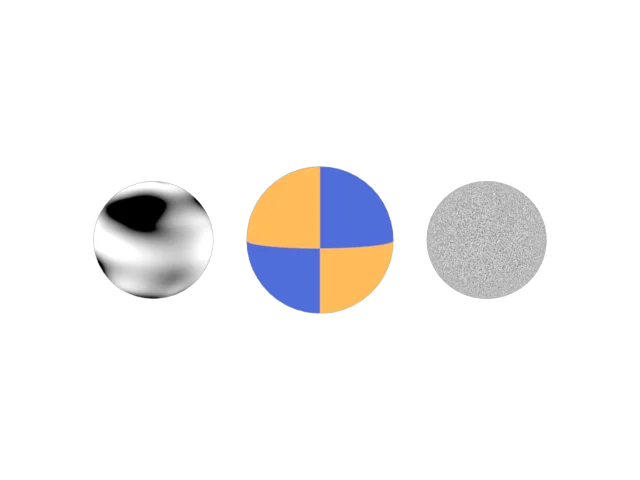
Noise、Matte棋盘和Arnold Noise的三个对照模型。
- 三个球分别显示传统Noise、Arnold Matte棋盘和Arnold Noise。
- Matte.color_shader连接Checker;Matte是平面颜色展示,不依靠灯光高光。
- Arnold Noise:Octaves1、Lacunarity1.92、Distortion0、Amplitude1。与传统Noise的坐标尺度比较。
- 视频未完成的参数连线实验不伪造结果;此文件侧重节点对照。
补齐与适配
- 视频末尾参数连线窗口未显示成功连接;实验工程不伪造该连线。
- 实验台模型、颜色、相机和光度学灯强度3000/光束80°/衰减100°为补齐。
展开实际工程节点数值(打开文件后读回)
这些是工程实施值,包含上方明确标注的补齐设置;不应把它们全部当作老师原值。
#17 Checker:Checker
| 参数 | 实施值 |
|---|---|
| Soften | 0.0 |
| color1 | {"scene_rgb_255": [255.0, 130.0, 25.0]} |
| color2 | {"scene_rgb_255": [20.0, 40.0, 180.0]} |
| map1 | null |
| map2 | null |
| map1Enabled | true |
| map2Enabled | true |
坐标:{"blur": 1.0, "mapping": 0, "mapChannel": 1, "mappingType": 0, "UVW_Type": 0, "U_Mirror": false, "V_Mirror": false, "U_Tile": true, "V_Tile": true, "showMapOnBack": true, "Noise_On": false, "Noise_Animate": false, "UVTransform": "(matrix3 [1,0,0] [0,1,0] [0,0,1] [0,0,0])", "realWorldScale": false, "realWorldHeight": 1.0, "realWorldWidth": 1.0, "phase": 0.0, "Blur_Offset": 0.0, "w_angle": 0.0, "U_Offset": 0.0, "V_Offset": 0.0, "U_Tiling": 1.0, "V_Tiling": 1.0, "U_Angle": 0.0, "V_Angle": 0.0, "Noise_Amount": 1.0, "Noise_Size": 1.0, "Noise_Levels": 1}
#13 Photometric projection Noise:Noise
| 参数 | 实施值 |
|---|---|
| color1 | {"scene_rgb_255": [0.0, 0.0, 0.0]} |
| color2 | {"scene_rgb_255": [255.0, 255.0, 255.0]} |
| map1 | null |
| map2 | null |
| map1Enabled | true |
| map2Enabled | true |
| size | 0.20000000298023224 |
| phase | 0.0 |
| Levels | 3.0 |
| thresholdLow | 0.4000000059604645 |
| thresholdHigh | 0.6000000238418579 |
| type | 0 |
坐标:{"blur": 1.0, "offset": [0.0, 0.0, 0.0], "angle": [0.0, 0.0, 0.0], "coordType": 2, "mapChannel": 1, "Tiling": [1.0, 1.0, 1.0], "Blur_Offset": 0.0}
#14 Arnold Noise:Noise
| 参数 | 实施值 |
|---|---|
| octaves | 1 |
| distortion | 0.0 |
| distortion_connected | true |
| distortion_shader | null |
| lacunarity | 1.9199999570846558 |
| lacunarity_connected | true |
| lacunarity_shader | null |
| Amplitude | 1.0 |
| amplitude_connected | true |
| amplitude_shader | null |
| scale | [1.0, 1.0, 1.0] |
| scale_connected | true |
| scale_shader | null |
| offset | [0.0, 0.0, 0.0] |
| offset_connected | true |
| offset_shader | null |
| coord_space | 1 |
| pref_name | Pref |
| p | [0.0, 0.0, 0.0] |
| P_connected | true |
| P_shader | null |
| time | 0.0 |
| time_connected | true |
| time_shader | null |
| color1 | {"scene_rgb_255": [0.0, 0.0, 0.0]} |
| color1_connected | true |
| color1_shader | null |
| color2 | {"scene_rgb_255": [255.0, 255.0, 255.0]} |
| color2_connected | true |
| color2_shader | null |
| mode | 0 |
05_Arnold_Gobo暖色投影
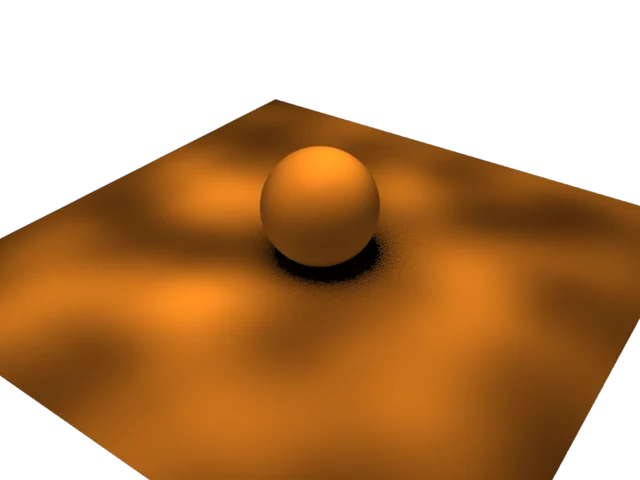
Spot+Gobo+Color Correction;CPU渲染。
- Arnold灯选Spot:Radius100、Cone180、Lens0、Penumbra5、Aspect1、Roundness1。
- 添加Arnold Light Gobo修改器,模式Replace、Density0、Scale1/1、Periodic。
- Slide Map连接Color Correction,再连接Object XYZ Noise(Size120)。
- Noise两色场景float为(.019,.001,0)与(1,.612,.177);Color Correction高级Gain500/Gamma.4/Pivot.5。
- Gobo把纹理投到承接面;位置、灯光强度沿用值等补齐内容见差异说明。
补齐与适配
- 200强度、6曝光来自较早Quad阶段;最终Spot未显示完整强度,重建沿用这组值。
- 承接面600×600、球半径60、灯与相机位置为补齐。
展开实际工程节点数值(打开文件后读回)
这些是工程实施值,包含上方明确标注的补齐设置;不应把它们全部当作老师原值。
#25 Warm Noise:Noise
| 参数 | 实施值 |
|---|---|
| color1 | {"scene_rgb_255": [4.84499979019165, 0.2549999952316284, 0.0]} |
| color2 | {"scene_rgb_255": [255.0, 156.05999755859375, 45.1349983215332]} |
| map1 | null |
| map2 | null |
| map1Enabled | true |
| map2Enabled | true |
| size | 120.0 |
| phase | 0.0 |
| Levels | 3.0 |
| thresholdLow | 0.0 |
| thresholdHigh | 1.0 |
| type | 0 |
坐标:{"blur": 1.0, "offset": [0.0, 0.0, 0.0], "angle": [0.0, 0.0, 0.0], "coordType": 0, "mapChannel": 1, "Tiling": [1.0, 1.0, 1.0], "Blur_Offset": 0.0}
#26 Gain500 Gamma0.4:Color Correction
| 参数 | 实施值 |
|---|---|
| color | {"scene_rgb_255": [0.0, 0.0, 0.0]} |
| map | {"connection": "#25 Warm Noise:Noise", "handle": 92456} |
| rewireMode | 0 |
| rewireR | 0 |
| rewireG | 1 |
| rewireB | 2 |
| rewireA | 3 |
| hueShift | 0.0 |
| saturation | 0.0 |
| tint | {"scene_rgb_255": [0.0, 0.0, 0.0]} |
| tintStrength | 0.0 |
| lightnessMode | 1 |
| contrast | 0.0 |
| brightness | 0.0 |
| exposureMode | 0 |
| enableR | false |
| enableG | false |
| enableB | false |
| gainRGB | 500.0 |
| gainR | 100.0 |
| gainG | 100.0 |
| gainB | 100.0 |
| gammaRGB | 0.4000000059604645 |
| gammaR | 1.0 |
| gammaG | 1.0 |
| gammaB | 1.0 |
| pivotRGB | 1.0 |
| pivotR | 1.0 |
| pivotG | 1.0 |
| pivotB | 1.0 |
| liftRGB | 0.0 |
| liftR | 0.0 |
| liftG | 0.0 |
| liftB | 0.0 |
| printerLights | 5.0 |
06_Falloff距离与视角
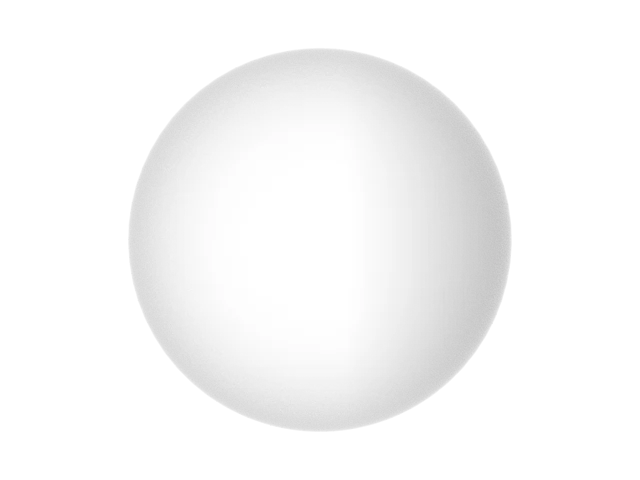
距离控制发光、视角控制透明;移动Point001观察。
- 球体使用Arnold发光材质。创建Point001放到(-100,-60,70)。
- Falloff50设Distance Blend、Object=Point001、Near10/Far200;连Emission。距离决定亮区。
- Falloff51设Perpendicular/Parallel、Camera Z、白/黑;连Opacity。视角决定轮廓透明。
- 移动Point001后渲染比较,避免同时改两个Falloff;曲线未显示部分保留默认。
补齐与适配
- Falloff混合曲线的切线手柄没有完整数值,工程使用默认曲线;球体半径90、Point位置(-100,-60,70)、相机为自选。
展开实际工程节点数值(打开文件后读回)
这些是工程实施值,包含上方明确标注的补齐设置;不应把它们全部当作老师原值。
#50 Distance:Falloff
| 参数 | 实施值 |
|---|---|
| color1 | {"scene_rgb_255": [0.0, 0.0, 0.0]} |
| map1Amount | 100.0 |
| map1 | null |
| map1On | true |
| color2 | {"scene_rgb_255": [255.0, 255.0, 255.0]} |
| map2Amount | 100.0 |
| map2 | null |
| map2On | true |
| type | 4 |
| direction | 1 |
| node | $Point_Helper:Point001 @ [-100.000000,-60.000000,70.000000] |
| mtlIOROverride | true |
| ior | 1.600000023841858 |
| extrapolateOn | false |
| nearDistance | 10.0 |
| farDistance | 200.0 |
| Texture_Output | {"connection": "MtlBase:Output", "handle": 95168} |
| MixCurve | ReferenceTarget:CurveControl |
#51 Opacity angle:Falloff
| 参数 | 实施值 |
|---|---|
| color1 | {"scene_rgb_255": [255.0, 255.0, 255.0]} |
| map1Amount | 100.0 |
| map1 | null |
| map1On | true |
| color2 | {"scene_rgb_255": [0.0, 0.0, 0.0]} |
| map2Amount | 100.0 |
| map2 | null |
| map2On | true |
| type | 1 |
| direction | 0 |
| node | null |
| mtlIOROverride | true |
| ior | 1.600000023841858 |
| extrapolateOn | false |
| nearDistance | 0.0 |
| farDistance | 100.0 |
| Texture_Output | {"connection": "MtlBase:Output", "handle": 95190} |
| MixCurve | ReferenceTarget:CurveControl |
07_紫金能量球
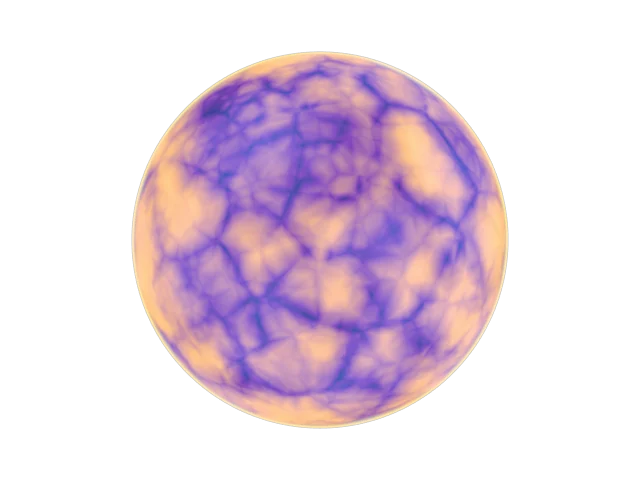
五旗标紫金色谱、亮边与世界坐标纹理分支。
- 建GeoSphere Radius150、Segments64。
- Falloff53→Mapped Ramp54,再与Noise57(Size63.5,Low.4,High1)Multiply;Cellular55通过Screen叠纹理。
- 颜色Ramp59五标:0(4,12,65)、6(59,15,127)、31(248,135,60)、71(255,211,78)、100(255,140,57)。
- Falloff60→Ramp61形成金边;Composite62依次Normal/Lighten/Screen,最后接Emission。
- Cellular55映射平铺.005为视觉适配;其Size .4仍保留。其它未读齐色标与蓝纹颜色属补齐。
补齐与适配
- Falloff53的最终参数未重新核对;使用原已有证据,不能套用Falloff60参数。
- Ramp61其余4旗标完整值未读齐。可自选旗标3暖金、5黑、70深蓝黑、100蓝;这些是补齐值,不是原视频抄值。
- Cellular63边界色1在2580仍被编辑,最终颜色未核对。
- Cellular55保持Size .4,映射平铺补为.005/.005/.005以得到可辨认的大纹理;这是视觉适配,非视频读值。
- Ramp54、Ramp61未读齐旗标、Cellular63颜色均为补齐,实际值见工程参数读回。
展开实际工程节点数值(打开文件后读回)
这些是工程实施值,包含上方明确标注的补齐设置;不应把它们全部当作老师原值。
#57 Noise:Noise
| 参数 | 实施值 |
|---|---|
| color1 | {"scene_rgb_255": [0.0, 0.0, 0.0]} |
| color2 | {"scene_rgb_255": [255.0, 255.0, 255.0]} |
| map1 | null |
| map2 | null |
| map1Enabled | true |
| map2Enabled | true |
| size | 63.5 |
| phase | 0.0 |
| Levels | 3.0 |
| thresholdLow | 0.4000000059604645 |
| thresholdHigh | 1.0 |
| type | 0 |
坐标:{"blur": 1.0, "offset": [0.0, 0.0, 0.0], "angle": [0.0, 0.0, 0.0], "coordType": 0, "mapChannel": 1, "Tiling": [1.0, 1.0, 1.0], "Blur_Offset": 0.0}
CompositeTexturemap:Composite
| 参数 | 实施值 |
|---|---|
| mapEnabled | [true, true, true] |
| maskEnabled | [true, true, true] |
| blendMode | [0, 8, 9] |
| layername | ["", "", ""] |
| dlgOpened | [true, true, true] |
| opacity | [100.0, 100.0, 100.0] |
CompositeTexturemap:Composite
| 参数 | 实施值 |
|---|---|
| mapEnabled | [true, true] |
| maskEnabled | [true, true] |
| blendMode | [0, 9] |
| layername | ["", ""] |
| dlgOpened | [true, true] |
| opacity | [100.0, 100.0] |
CompositeTexturemap:Composite
| 参数 | 实施值 |
|---|---|
| mapEnabled | [true, true] |
| maskEnabled | [true, true] |
| blendMode | [0, 5] |
| layername | ["", ""] |
| dlgOpened | [true, true] |
| opacity | [100.0, 100.0] |
#59 Purple gold palette:Gradient Ramp
| 参数 | 实施值 |
|---|---|
| size | 1.0 |
| phase | 0.0 |
| amount | 0.0 |
| Gradient_Type | 5 |
| Noise_Type | 0 |
| Levels | 4.0 |
| Low_Threshold | 0.0 |
| High_Threshold | 1.0 |
| Threshold_Smoothing | 0.0 |
| Source_Map_On | 1 |
| Source_Map | {"connection": "CompositeTexturemap:Composite", "handle": 98625} |
色标(位置 → 场景RGB):0 → (4.0, 12.0, 65.0);6 → (59.0, 15.0, 127.0);31 → (248.0, 135.0, 60.0);71 → (255.0, 211.0, 78.0);100 → (255.0, 140.0, 57.0)
坐标:{"blur": 1.0, "mapping": 0, "mapChannel": 1, "mappingType": 0, "UVW_Type": 0, "U_Mirror": false, "V_Mirror": false, "U_Tile": true, "V_Tile": true, "showMapOnBack": true, "Noise_On": false, "Noise_Animate": false, "UVTransform": "(matrix3 [1,0,0] [0,1,0] [0,0,1] [0,0,0])", "realWorldScale": false, "realWorldHeight": 1.0, "realWorldWidth": 1.0, "phase": 0.0, "Blur_Offset": 0.0, "w_angle": 0.0, "U_Offset": 0.0, "V_Offset": 0.0, "U_Tiling": 1.0, "V_Tiling": 1.0, "U_Angle": 0.0, "V_Angle": 0.0, "Noise_Amount": 1.0, "Noise_Size": 1.0, "Noise_Levels": 1}
#54 Structure remap_FILLED:Gradient Ramp
| 参数 | 实施值 |
|---|---|
| size | 1.0 |
| phase | 0.0 |
| amount | 0.0 |
| Gradient_Type | 5 |
| Noise_Type | 0 |
| Levels | 4.0 |
| Low_Threshold | 0.0 |
| High_Threshold | 1.0 |
| Threshold_Smoothing | 0.0 |
| Source_Map_On | 1 |
| Source_Map | {"connection": "#53 Structure angle_FILLED:Falloff", "handle": 98511} |
色标(位置 → 场景RGB):0 → (0.0, 0.0, 0.0);35 → (18.0, 18.0, 18.0);70 → (170.0, 170.0, 170.0);100 → (255.0, 255.0, 255.0)
坐标:{"blur": 1.0, "mapping": 0, "mapChannel": 1, "mappingType": 0, "UVW_Type": 0, "U_Mirror": false, "V_Mirror": false, "U_Tile": true, "V_Tile": true, "showMapOnBack": true, "Noise_On": false, "Noise_Animate": false, "UVTransform": "(matrix3 [1,0,0] [0,1,0] [0,0,1] [0,0,0])", "realWorldScale": false, "realWorldHeight": 1.0, "realWorldWidth": 1.0, "phase": 0.0, "Blur_Offset": 0.0, "w_angle": 0.0, "U_Offset": 0.0, "V_Offset": 0.0, "U_Tiling": 1.0, "V_Tiling": 1.0, "U_Angle": 0.0, "V_Angle": 0.0, "Noise_Amount": 1.0, "Noise_Size": 1.0, "Noise_Levels": 1}
#61 Gold rim_partial_FILLED:Gradient Ramp
| 参数 | 实施值 |
|---|---|
| size | 1.0 |
| phase | 0.0 |
| amount | 0.0 |
| Gradient_Type | 5 |
| Noise_Type | 0 |
| Levels | 4.0 |
| Low_Threshold | 0.0 |
| High_Threshold | 1.0 |
| Threshold_Smoothing | 0.0 |
| Source_Map_On | 1 |
| Source_Map | {"connection": "#60 Rim angle_FILLED:Falloff", "handle": 99087} |
色标(位置 → 场景RGB):0 → (255.0, 205.0, 87.0);12 → (255.0, 205.0, 87.0);25 → (25.0, 14.0, 2.0);40 → (0.0, 0.0, 0.0);100 → (0.0, 0.0, 0.0)
坐标:{"blur": 1.0, "mapping": 0, "mapChannel": 1, "mappingType": 0, "UVW_Type": 0, "U_Mirror": false, "V_Mirror": false, "U_Tile": true, "V_Tile": true, "showMapOnBack": true, "Noise_On": false, "Noise_Animate": false, "UVTransform": "(matrix3 [1,0,0] [0,1,0] [0,0,1] [0,0,0])", "realWorldScale": false, "realWorldHeight": 1.0, "realWorldWidth": 1.0, "phase": 0.0, "Blur_Offset": 0.0, "w_angle": 0.0, "U_Offset": 0.0, "V_Offset": 0.0, "U_Tiling": 1.0, "V_Tiling": 1.0, "U_Angle": 0.0, "V_Angle": 0.0, "Noise_Amount": 1.0, "Noise_Size": 1.0, "Noise_Levels": 1}
#53 Structure angle_FILLED:Falloff
| 参数 | 实施值 |
|---|---|
| color1 | {"scene_rgb_255": [0.0, 0.0, 0.0]} |
| map1Amount | 100.0 |
| map1 | null |
| map1On | true |
| color2 | {"scene_rgb_255": [255.0, 255.0, 255.0]} |
| map2Amount | 100.0 |
| map2 | null |
| map2On | true |
| type | 1 |
| direction | 0 |
| node | null |
| mtlIOROverride | true |
| ior | 1.600000023841858 |
| extrapolateOn | false |
| nearDistance | 0.0 |
| farDistance | 100.0 |
| Texture_Output | {"connection": "MtlBase:Output", "handle": 98505} |
| MixCurve | ReferenceTarget:CurveControl |
#60 Rim angle_FILLED:Falloff
| 参数 | 实施值 |
|---|---|
| color1 | {"scene_rgb_255": [255.0, 255.0, 255.0]} |
| map1Amount | 100.0 |
| map1 | null |
| map1On | true |
| color2 | {"scene_rgb_255": [0.0, 0.0, 0.0]} |
| map2Amount | 100.0 |
| map2 | null |
| map2On | true |
| type | 1 |
| direction | 0 |
| node | null |
| mtlIOROverride | true |
| ior | 1.600000023841858 |
| extrapolateOn | false |
| nearDistance | 0.0 |
| farDistance | 100.0 |
| Texture_Output | {"connection": "MtlBase:Output", "handle": 99081} |
| MixCurve | ReferenceTarget:CurveControl |
#55 Cellular_mappingScale_FILLED:Cellular
| 参数 | 实施值 |
|---|---|
| cellColor | {"scene_rgb_255": [255.0, 255.0, 255.0]} |
| divColor1 | {"scene_rgb_255": [127.5, 127.5, 127.5]} |
| divColor2 | {"scene_rgb_255": [0.0, 0.0, 0.0]} |
| cellMap | null |
| divMap1 | null |
| divMap2 | null |
| map1Enabled | true |
| map2Enabled | true |
| map3Enabled | true |
| variation | 0.0 |
| size | 0.4000000059604645 |
| spread | 3.0 |
| lowThresh | 0.0 |
| midThresh | 0.5 |
| highThresh | 1.0 |
| type | 1 |
| fractal | true |
| iteration | 3.0 |
| roughness | 0.0 |
| smooth | 0.10000000149011612 |
| adaptive | true |
坐标:{"blur": 1.0, "offset": [0.0, 0.0, 0.0], "angle": [0.0, 0.0, 0.0], "coordType": 0, "mapChannel": 1, "Tiling": [0.004999999888241291, 0.004999999888241291, 0.004999999888241291], "Blur_Offset": 0.0}
#63 World blue cellular:Cellular
| 参数 | 实施值 |
|---|---|
| cellColor | {"scene_rgb_255": [0.0, 20.0, 95.0]} |
| divColor1 | {"scene_rgb_255": [0.0, 0.0, 8.0]} |
| divColor2 | {"scene_rgb_255": [0.0, 0.0, 0.0]} |
| cellMap | null |
| divMap1 | null |
| divMap2 | null |
| map1Enabled | true |
| map2Enabled | true |
| map3Enabled | true |
| variation | 0.0 |
| size | 100.0 |
| spread | 0.8999999761581421 |
| lowThresh | 0.0 |
| midThresh | 0.5 |
| highThresh | 1.0 |
| type | 0 |
| fractal | true |
| iteration | 2.0 |
| roughness | 0.0 |
| smooth | 0.10000000149011612 |
| adaptive | true |
坐标:{"blur": 1.0, "offset": [0.0, 0.0, 0.0], "angle": [0.0, 0.0, 0.0], "coordType": 1, "mapChannel": 1, "Tiling": [1.0, 1.0, 1.0], "Blur_Offset": 0.0}
08_冲击能量团
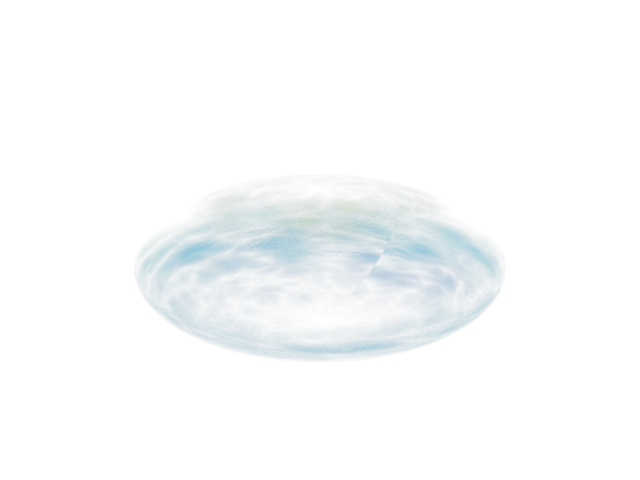
42帧;黄青发光、四层形状遮罩与补齐消失包络。
- 建Sphere Radius40、Segments64。材质Base0、Specular0、Emission1。
- 颜色Ramp6 W90,Turbulence Amount.5/Size4/Phase2.3/Levels4,黄到青蓝。
- Opacity Composite:Ramp1 Normal、Falloff4 Multiply、Ramp7 Darken、Noise8 Multiply(最后模式补齐)。
- Noise8:Tiling3/4/1、Turbulence、Size.3、Low0/High.9、Levels3;60帧Voffset8/Phase-4。Color1场景灰.068。
- Ramp7在53帧Voffset-.32。位移、缩放及额外可见度包络为补齐,形成落下、压扁、扩散、消失。
补齐与适配
- Ramp1/7完整旗标未读齐;保留later_notes已读值。
- Noise8 layer4混合模式未读到。可补齐Multiply(重建自选)。
- Noise8 phase/offset起点未读到,可补齐frame0 phase0,offsetV0 -> frame60 phase-4,offsetV8(后端已见,起点自选)。
- 完整运动和缩放关键帧精确数值未读齐,以上近似图读不得当逐值原抄。
- 增加独立VisibilityEnvelope补齐消失段;模型位移、缩放和多数曲线为重建,不称逐值复制。
展开实际工程节点数值(打开文件后读回)
这些是工程实施值,包含上方明确标注的补齐设置;不应把它们全部当作老师原值。
#8 Turbulence:Noise
| 参数 | 实施值 |
|---|---|
| color1 | {"scene_rgb_255": [17.34000015258789, 17.34000015258789, 17.34000015258789]} |
| color2 | {"scene_rgb_255": [255.0, 255.0, 255.0]} |
| map1 | null |
| map2 | null |
| map1Enabled | true |
| map2Enabled | true |
| size | 0.30000001192092896 |
| phase | 0.0 |
| Levels | 3.0 |
| thresholdLow | 0.0 |
| thresholdHigh | 0.8999999761581421 |
| type | 2 |
坐标:{"blur": 1.0, "offset": [0.0, 0.0, 0.0], "angle": [0.0, 0.0, 0.0], "coordType": 2, "mapChannel": 1, "Tiling": [3.0, 4.0, 1.0], "Blur_Offset": 0.0}
CompositeTexturemap:Composite
| 参数 | 实施值 |
|---|---|
| mapEnabled | [true, true, true, true, true] |
| maskEnabled | [true, true, true, true, true] |
| blendMode | [0, 5, 4, 5, 5] |
| layername | ["", "", "", "", ""] |
| dlgOpened | [true, true, true, true, true] |
| opacity | [100.0, 100.0, 100.0, 100.0, 100.0] |
VisibilityEnvelope_FILLED:Color Correction
| 参数 | 实施值 |
|---|---|
| color | {"scene_rgb_255": [0.0, 0.0, 0.0]} |
| map | null |
| rewireMode | 0 |
| rewireR | 0 |
| rewireG | 1 |
| rewireB | 2 |
| rewireA | 3 |
| hueShift | 0.0 |
| saturation | 0.0 |
| tint | {"scene_rgb_255": [0.0, 0.0, 0.0]} |
| tintStrength | 0.0 |
| lightnessMode | 0 |
| contrast | 0.0 |
| brightness | 0.0 |
| exposureMode | 0 |
| enableR | false |
| enableG | false |
| enableB | false |
| gainRGB | 100.0 |
| gainR | 100.0 |
| gainG | 100.0 |
| gainB | 100.0 |
| gammaRGB | 1.0 |
| gammaR | 1.0 |
| gammaG | 1.0 |
| gammaB | 1.0 |
| pivotRGB | 1.0 |
| pivotR | 1.0 |
| pivotG | 1.0 |
| pivotB | 1.0 |
| liftRGB | 0.0 |
| liftR | 0.0 |
| liftG | 0.0 |
| liftB | 0.0 |
| printerLights | 5.0 |
#6 Yellow cyan:Gradient Ramp
| 参数 | 实施值 |
|---|---|
| size | 4.0 |
| phase | 2.299999952316284 |
| amount | 0.5 |
| Gradient_Type | 4 |
| Noise_Type | 2 |
| Levels | 4.0 |
| Low_Threshold | 0.0 |
| High_Threshold | 1.0 |
| Threshold_Smoothing | 0.0 |
| Source_Map_On | 1 |
色标(位置 → 场景RGB):0 → (255.0, 245.0, 0.0);50 → (0.0, 220.0, 255.0);100 → (0.0, 70.0, 255.0)
坐标:{"blur": 1.0, "mapping": 0, "mapChannel": 1, "mappingType": 0, "UVW_Type": 0, "U_Mirror": false, "V_Mirror": false, "U_Tile": true, "V_Tile": true, "showMapOnBack": true, "Noise_On": false, "Noise_Animate": false, "UVTransform": "(matrix3 [0,1,0] [-1,0,0] [0,0,1] [1,0,0])", "realWorldScale": false, "realWorldHeight": 1.0, "realWorldWidth": 1.0, "phase": 0.0, "Blur_Offset": 0.0, "w_angle": 90.0, "U_Offset": 0.0, "V_Offset": 0.0, "U_Tiling": 1.0, "V_Tiling": 1.0, "U_Angle": 0.0, "V_Angle": 0.0, "Noise_Amount": 1.0, "Noise_Size": 1.0, "Noise_Levels": 1}
#1 Shape_FILLED:Gradient Ramp
| 参数 | 实施值 |
|---|---|
| size | 1.0 |
| phase | 0.0 |
| amount | 0.0 |
| Gradient_Type | 4 |
| Noise_Type | 0 |
| Levels | 4.0 |
| Low_Threshold | 0.0 |
| High_Threshold | 1.0 |
| Threshold_Smoothing | 0.0 |
| Source_Map_On | 1 |
色标(位置 → 场景RGB):0 → (0.0, 0.0, 0.0);12 → (255.0, 255.0, 255.0);70 → (255.0, 255.0, 255.0);100 → (0.0, 0.0, 0.0)
坐标:{"blur": 1.0, "mapping": 0, "mapChannel": 1, "mappingType": 0, "UVW_Type": 0, "U_Mirror": false, "V_Mirror": false, "U_Tile": true, "V_Tile": true, "showMapOnBack": true, "Noise_On": false, "Noise_Animate": false, "UVTransform": "(matrix3 [0,1,0] [-1,0,0] [0,0,1] [1,0,0])", "realWorldScale": false, "realWorldHeight": 1.0, "realWorldWidth": 1.0, "phase": 0.0, "Blur_Offset": 0.0, "w_angle": 90.0, "U_Offset": 0.0, "V_Offset": 0.0, "U_Tiling": 1.0, "V_Tiling": 1.0, "U_Angle": 0.0, "V_Angle": 0.0, "Noise_Amount": 1.0, "Noise_Size": 1.0, "Noise_Levels": 1}
#7 Moving gate_FILLED:Gradient Ramp
| 参数 | 实施值 |
|---|---|
| size | 1.0 |
| phase | 0.0 |
| amount | 0.0 |
| Gradient_Type | 4 |
| Noise_Type | 0 |
| Levels | 4.0 |
| Low_Threshold | 0.0 |
| High_Threshold | 1.0 |
| Threshold_Smoothing | 0.0 |
| Source_Map_On | 1 |
色标(位置 → 场景RGB):0 → (0.0, 0.0, 0.0);20 → (0.0, 0.0, 0.0);45 → (255.0, 255.0, 255.0);80 → (255.0, 255.0, 255.0);100 → (0.0, 0.0, 0.0)
坐标:{"blur": 1.0, "mapping": 0, "mapChannel": 1, "mappingType": 0, "UVW_Type": 0, "U_Mirror": false, "V_Mirror": false, "U_Tile": true, "V_Tile": true, "showMapOnBack": true, "Noise_On": false, "Noise_Animate": false, "UVTransform": "(matrix3 [0,1,0] [-1,0,0] [0,0,1] [1,0,0])", "realWorldScale": false, "realWorldHeight": 1.0, "realWorldWidth": 1.0, "phase": 0.0, "Blur_Offset": 0.0, "w_angle": 90.0, "U_Offset": 0.0, "V_Offset": 0.0, "U_Tiling": 1.0, "V_Tiling": 1.0, "U_Angle": 0.0, "V_Angle": 0.0, "Noise_Amount": 1.0, "Noise_Size": 1.0, "Noise_Levels": 1}
#4 Edge_FILLED:Falloff
| 参数 | 实施值 |
|---|---|
| color1 | {"scene_rgb_255": [255.0, 255.0, 255.0]} |
| map1Amount | 100.0 |
| map1 | null |
| map1On | true |
| color2 | {"scene_rgb_255": [0.0, 0.0, 0.0]} |
| map2Amount | 100.0 |
| map2 | null |
| map2On | true |
| type | 1 |
| direction | 0 |
| node | null |
| mtlIOROverride | true |
| ior | 1.600000023841858 |
| extrapolateOn | false |
| nearDistance | 0.0 |
| farDistance | 100.0 |
| Texture_Output | {"connection": "MtlBase:Output", "handle": 102635} |
| MixCurve | ReferenceTarget:CurveControl |
09_光度学Noise投影
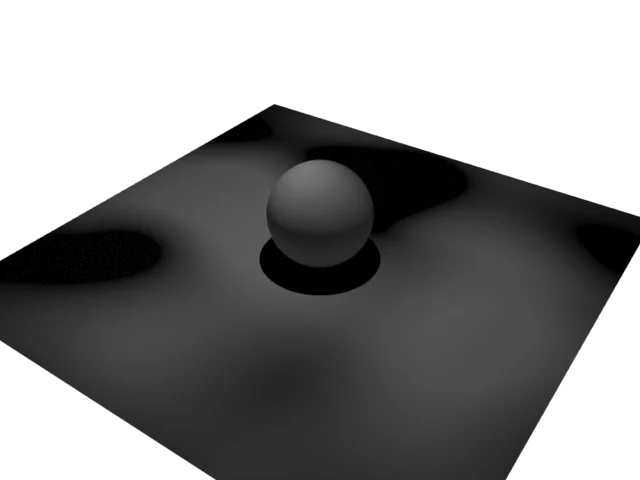
光度学灯Projector Map连接Noise,独立承接面与球。
- 创建光度学Free Light,选Spotlight分布并打开Projector Map。
- Noise13:显式UV1、Regular、Size.2、Low.4/High.6;连接Projector Map。
- 球和地面使用Arnold Standard Surface接受投影。
- 灯强度3000、光束80/衰减100及布景为演示补齐,目的是隔离观察Noise投影。
补齐与适配
- 视频末尾参数连线窗口未显示成功连接;实验工程不伪造该连线。
- 实验台模型、颜色、相机和光度学灯强度3000/光束80°/衰减100°为补齐。
展开实际工程节点数值(打开文件后读回)
这些是工程实施值,包含上方明确标注的补齐设置;不应把它们全部当作老师原值。
#13 Projection Noise:Noise
| 参数 | 实施值 |
|---|---|
| color1 | {"scene_rgb_255": [0.0, 0.0, 0.0]} |
| color2 | {"scene_rgb_255": [255.0, 255.0, 255.0]} |
| map1 | null |
| map2 | null |
| map1Enabled | true |
| map2Enabled | true |
| size | 0.20000000298023224 |
| phase | 0.0 |
| Levels | 3.0 |
| thresholdLow | 0.4000000059604645 |
| thresholdHigh | 0.6000000238418579 |
| type | 0 |
坐标:{"blur": 1.0, "offset": [0.0, 0.0, 0.0], "angle": [0.0, 0.0, 0.0], "coordType": 2, "mapChannel": 1, "Tiling": [1.0, 1.0, 1.0], "Blur_Offset": 0.0}
CPU渲染是本机旧贴图/Gobo兼容选择。原视频帧索引与渲染动画帧不是同一概念;前者用于复习,后者为低分辨率实际工程预览。